
It starts when your car connects.
Odie recognises your car over Bluetooth or CarPlay, and the motion sensor confirms you are driving. The trip records itself, distance and route, on your phone.
For people who drive for work · Canada and United States
Claim every work trip. Odie keeps the log.
No more rebuilding your log from memory in April.
How Odie works
Odie recognises your car over Bluetooth or CarPlay, and the motion sensor confirms you are driving. The trip records itself, distance and route, on your phone.
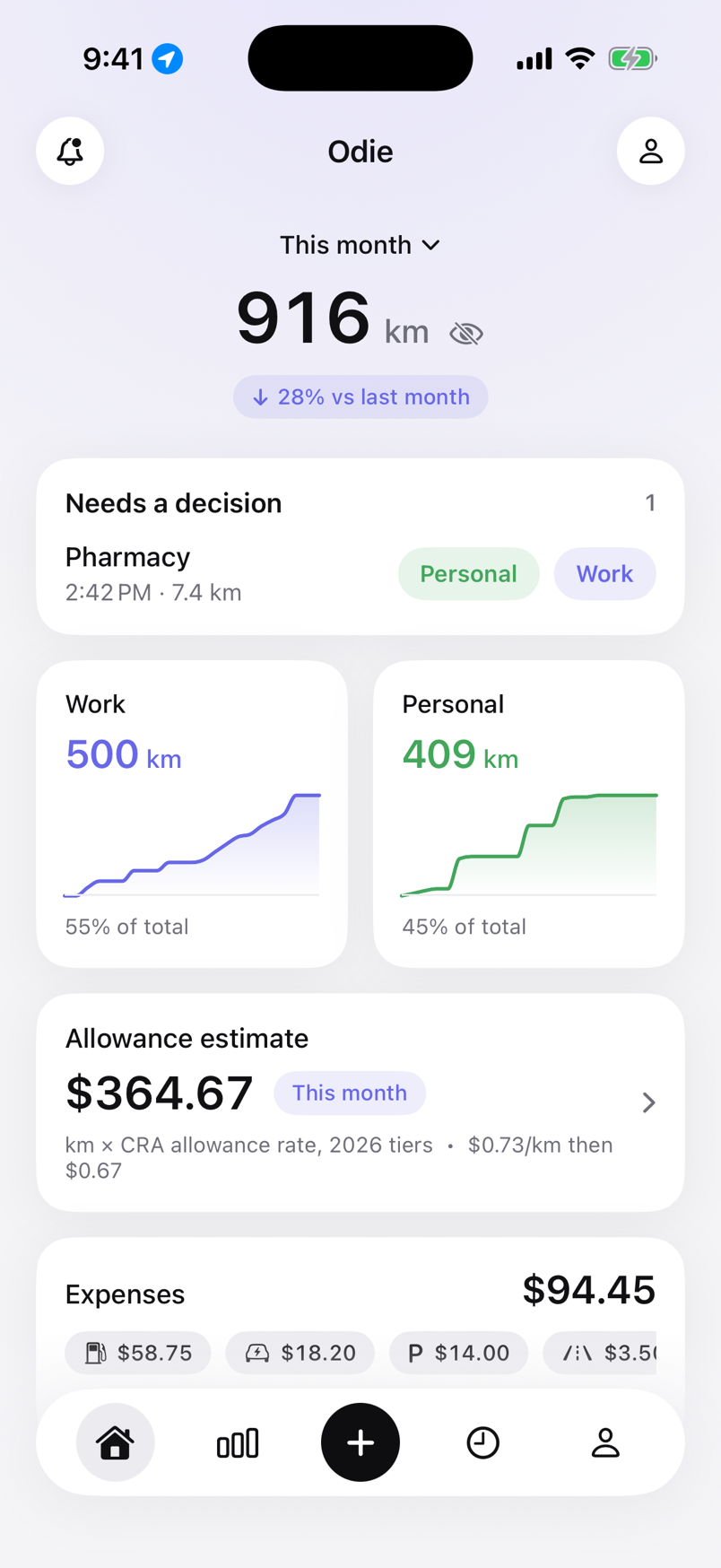
When the trip ends, the card on your Lock Screen asks Work or Personal. In the list, swipe right for Work and left for Personal.
Once your last eight trips on a route were marked the same way, Odie fills in the next one, marks it Auto and shows you why. One tap changes it.
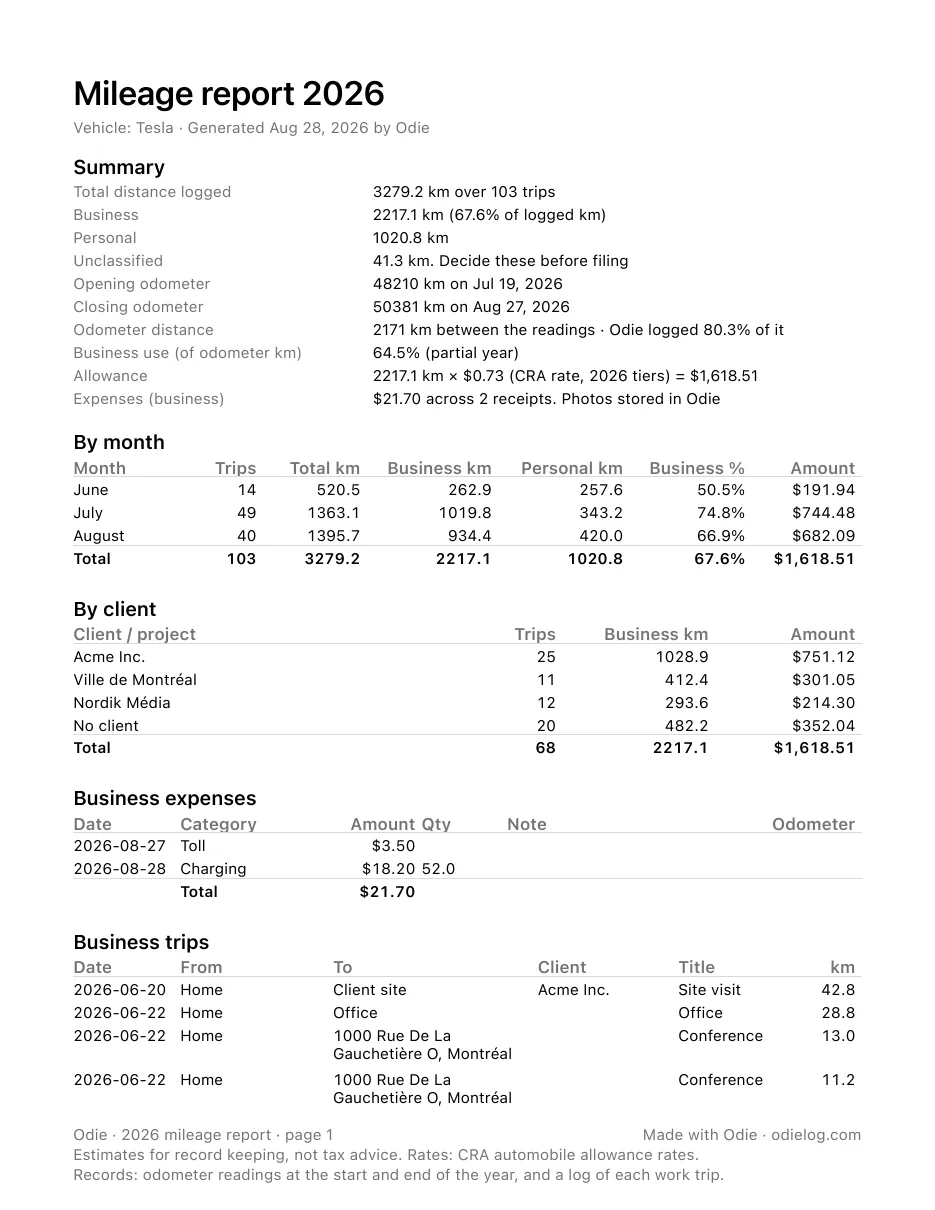
The year report your accountant expects: totals by month and by client, expenses, the trip log and your odometer readings, in the shape the CRA and the IRS describe.
What a log is worth
The deduction is only as good as the log behind it. Both tax authorities want each business trip recorded at the time: date, destination, purpose, distance.
Canada · self-employed
Car costs × business share
On the T2125 you deduct the business share of real car costs: fuel, insurance, maintenance, interest or lease, and capital cost allowance. The share is business kilometres over total kilometres, and the log is what proves it.
Example: $11,000 of car costs and 45% business kilometres is a $4,950 deduction. Paid per kilometre by an employer instead? 2026: 73¢ for the first 5,000 km, 67¢ after, tax-free.
The CRA on motor vehicle expensesUnited States · self-employed
72.5¢ / 76¢
per business mile in 2026 (Jan 1 to Jun 30, 2026, then Jul 1 to Dec 31, 2026), deducted on Schedule C if you use the standard mileage rate. Parking and tolls on business trips go on top.
Example: 10,000 business miles, half before July 1 and half after, is a $7,425 deduction.
IRS mileage calculatorA log rebuilt from memory in April is the part that does not hold up in a review. Why reconstructed logs fail · Mileage calculator
How a trip starts
Most trackers guess from speed and motion, which is why they log bus rides and split a drive every time you stop for coffee. Odie waits for your own car, over its Bluetooth or CarPlay. No beacon to buy, no button to press.
Odie recognises your car’s Bluetooth or CarPlay connection, not just any motion.
The iPhone’s motion sensor confirms you are driving before recording starts.
Distance and route are saved on the phone. When the car disappears, the trip ends.
Tax time
A year PDF in the shape a tax authority describes: summary, monthly totals, per-client totals, expenses, the trip log and your opening and closing odometer readings. CSV for people who want to rework the numbers.
Open a real one: sample report, Canada (PDF) · sample report, United States (PDF)
Rates
A dated rate table for 2024 to 2026, from canada.ca and irs.gov, each trip priced at the rate of its date. Canada: the CRA’s two tiers, first 5,000 km then the rest, applied in date order across all your cars, with a switch for the territories. United States: the IRS standard rate with its mid-year change, medical and charity purposes, and parking and tolls on top. Override this year’s rate if your employer pays another, or set your own.
Expenses
Log a fill-up in litres or gallons, or a charge in kWh, snap the receipt, and see cost per litre, per gallon or per kWh over time. Self-employed? Odie can apply your business-use share to the total.
Expenses and business useOdometer
Enter a reading now and then. Odie compares the odometer to the distance it recorded and tells you what percentage of your driving is in the log.
Why the odometer readings matterPrivacy
A mileage log is a record of where you go. Odie keeps it that way: no account to create, no servers of ours, no analytics or ad code. Sync, if you want it, goes through your own private iCloud. The App Store label reads “Data Not Collected”.
App Privacy
Data Not Collected
The developer does not collect any data from this app.
Why Odie exists
Odie started with a notes file. Driving to client sites around Montréal, the mileage log was filled in from memory at the end of the month. The accountant was polite about it. The tax people would not have been.
The apps I tried wanted an account and permission to track me all the time, and they still logged the metro and split a drive every time I stopped for gas. I did not want a dashboard. I wanted the trip to be there when I got out of the car, a way to say Work or Personal with one tap, and a PDF in March.
So Odie watches for your car’s Bluetooth, records the trip on the phone, and asks one question when it ends. It has no server because it does not need one. It is in English and French because Québec is home.
If that is the logbook you wanted too, I hope you will try it. Questions go straight to me at the support address.
 Taylor Brown
Founder, Montréal
Who it is for
Client sites, suppliers, job to job. The log behind your vehicle deduction.
Dozens of short trips a day, each one a deductible distance.
Showings, listings and open houses, with the client on each trip.
The log your employer or payroll asks for, at the CRA rate.
Electricians, plumbers, home care, inspectors, sales reps and more
Two countries
Odie asks where you file taxes and sets the unit, the currency and the rates to match. Nothing else changes: the same detection, the same one question per trip, the same PDF.
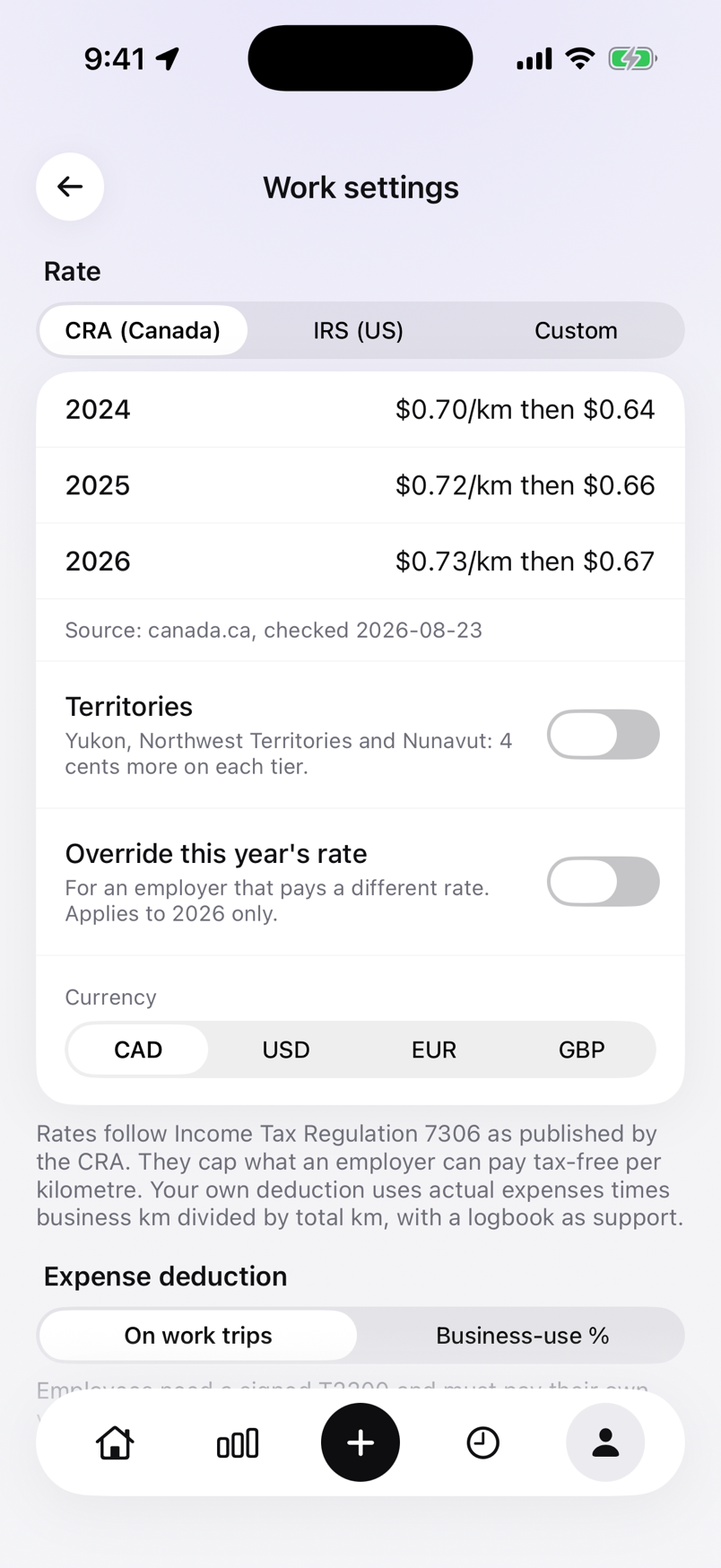
Canada
The CRA’s two-tier allowance applied in date order, the business-use method for the self-employed, and a report in the shape the CRA describes, in French or English. Revenu Québec’s registre des déplacements is covered on the Canada page.
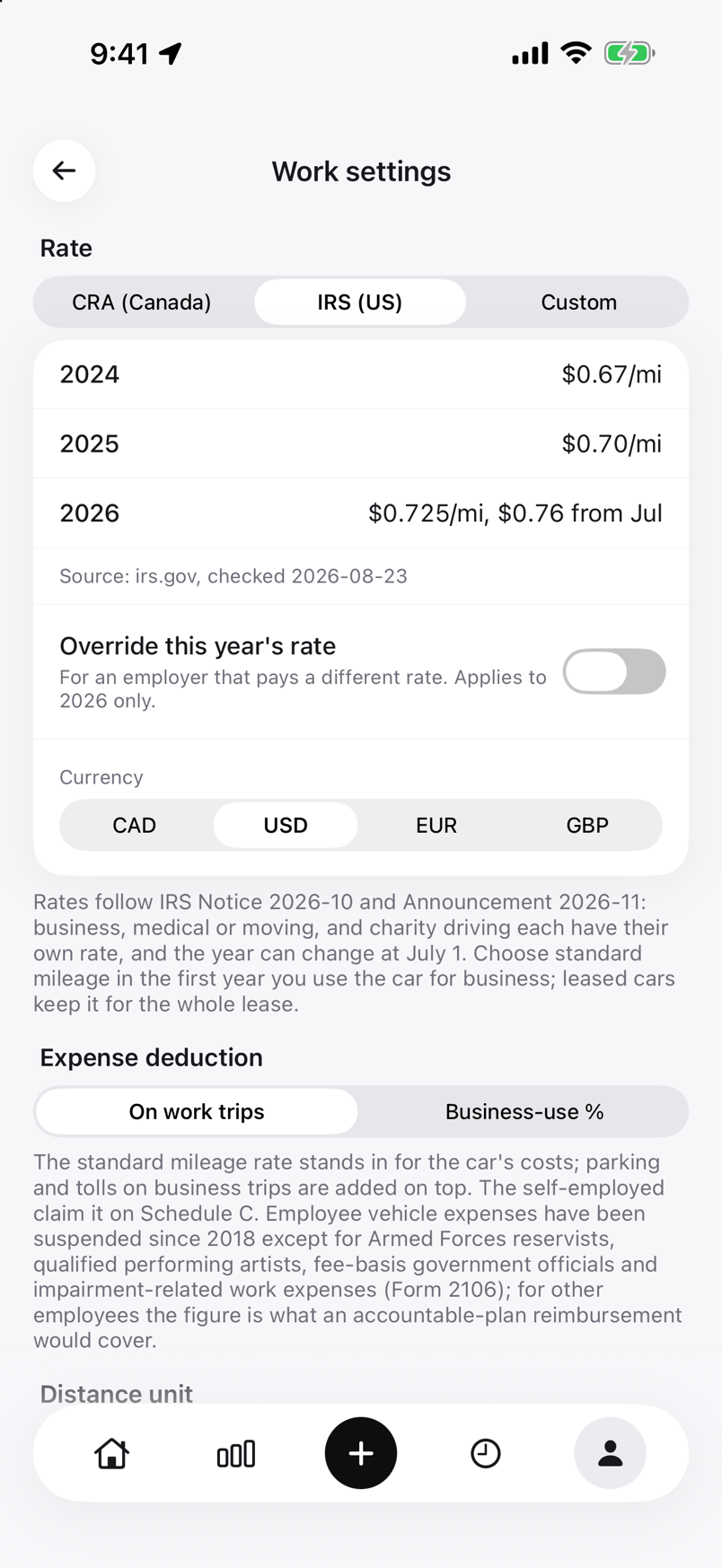
United States
The IRS standard rate priced per trip across its mid-year changes, medical and charity purposes, parking and tolls added the way Publication 463 allows, and a report for Schedule C or for the employer that reimburses you.
Odie for the United StatesPrice
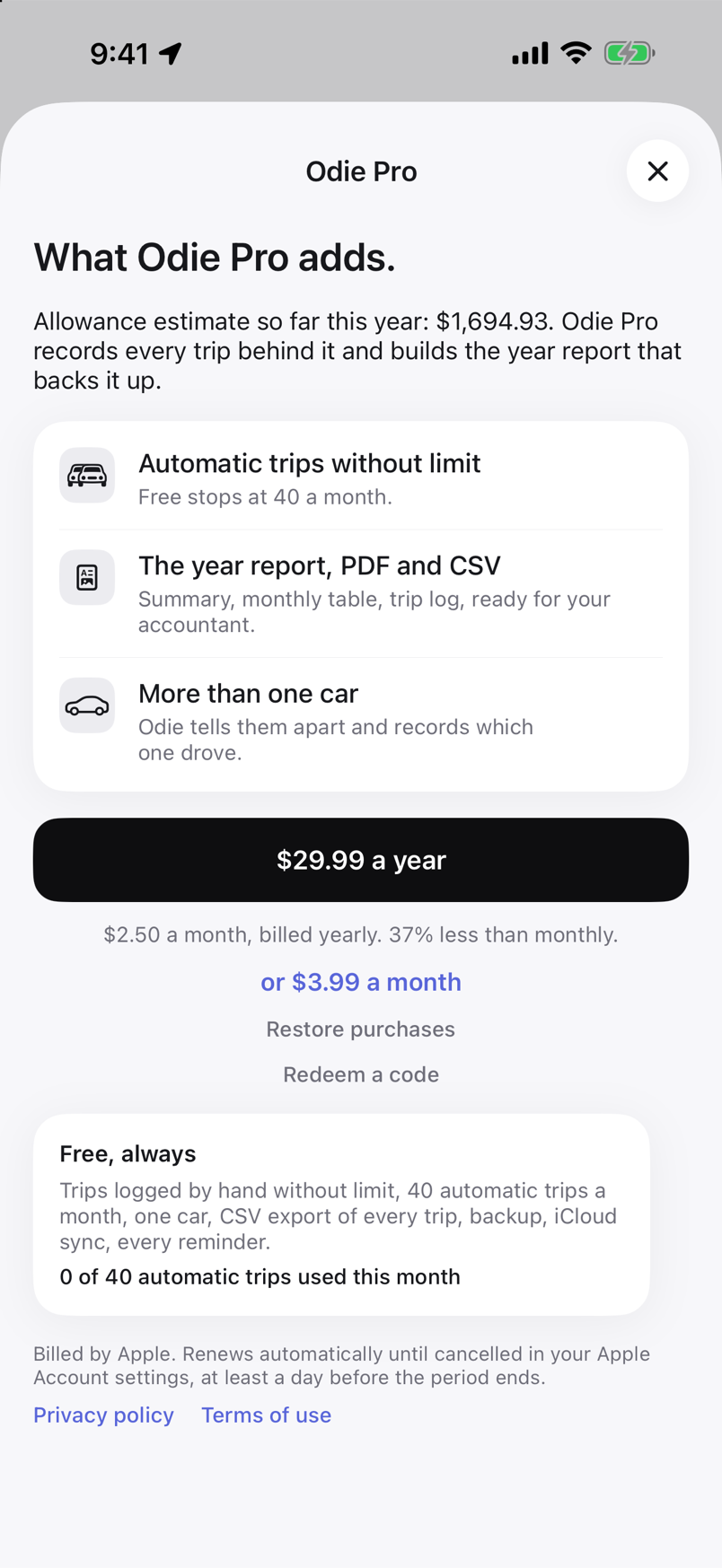
The free tier does not expire: 40 automatic trips every month, trips logged by hand without limit, one car, CSV export of every trip, backup and iCloud sync. No card needed.
Odie Pro adds automatic trips without limit, the year report as PDF and CSV, and more than one car. Billed by Apple, cancelled any time in your Apple Account settings.
Canada
$3.33 CADa month, billed yearly
$39.99 CAD a year, 33% less than $4.99 CAD monthly
United States
$2.50 USDa month, billed yearly
$29.99 USD a year, 37% less than $3.99 USD monthly
It depends on how you are paid. Self-employed in the United States: each business mile is a 72.5¢ deduction for January to June 2026 and 76¢ from July 1, if you use the standard mileage rate. Self-employed in Canada: you deduct your business share of real car costs, and the log is what proves the share. Paid per kilometre by an employer in Canada: 73¢ for the first 5,000 km in 2026 and 67¢ after, tax-free. The mileage calculator works out the rate-based amounts.
Both ask for the same core facts, recorded at the time: the date, the destination, the purpose and the distance of each business trip, plus your total driving for the year. Odie records the date, places and distance as you drive, you add the purpose, and the year report has the odometer readings. What neither agency accepts well is a log rebuilt from memory; see reconstructing a mileage log.
No. There is nothing to sign up for. Your trips live on your iPhone, and if you leave iCloud sync on they are also copied to your own private iCloud database, which we cannot read.
Odie watches for the car you picked during setup: its hands-free Bluetooth name, or its CarPlay connection, wired or wireless. When that car shows up and the motion sensor agrees you are driving, a trip starts. Buses, bikes and a friend’s car do not match, so they do not start a trip.
If your car does not pair over Bluetooth, there is a motion-only mode. It asks you to confirm each trip, because motion alone cannot tell your car from a taxi.
A year PDF with a summary, a monthly table, a per-client table, business expenses, the business trip log and the opening and closing odometer readings. The same data exports as CSV for Excel or Numbers.
Odie wakes on significant location changes and only turns on GPS while your car is connected and you are moving. Settings shows how many minutes of GPS it used and an estimate of the cost, so you can check instead of taking our word for it.
Odie is iPhone only (iOS 17 and later). There is no Android or web version planned right now.
Yes to start. The free tier covers trips logged by hand without limit, 40 automatic trips a month, one car, CSV export of every trip, backup and iCloud sync. Odie Pro adds automatic trips without limit, the year report as PDF and CSV, and more than one car: $4.99 CAD or $3.99 USD a month, $39.99 CAD or $29.99 USD a year, billed by Apple.
There is no trial period because the free tier does not expire: 40 automatic trips every month, no card needed.
Every work trip logged as you drove, one PDF for your accountant, and no evening in April rebuilding the year. Free for 40 automatic trips a month, no account, no card.