
Blog · · Updated
Your December 31 odometer reading for the CRA
Write down your odometer before midnight on December 31: one number closes 2026 and opens 2027. What to do if you miss it, and how Odie keeps it.
A self-employed mobile dog groomer in Halifax wrote down 62,300 km on her odometer on the evening of December 31, 2025. If the dash says 88,300 km on December 31, 2026, the car drove 26,000 km this year. Her log shows 11,700 business kilometres to clients’ homes, so her business use is 11,700 ÷ 26,000 = 45%. On $11,000 of car costs, that is $11,000 × 45% = $4,950 on her T2125.
The 26,000 comes from two numbers on the dash, and the second one has to be read as the year turns. Write down your odometer before midnight on December 31. If you forget, write it down on January 1 before you drive anywhere. That one number closes 2026 and opens 2027.
Why the CRA wants this number
The CRA’s motor vehicle records page asks you to record the odometer reading of each vehicle at the start and end of the fiscal period, alongside a log of each business trip. If your business year runs January to December, the end is December 31. Employees who deduct car expenses on line 22900 with a T2200 get the same instruction in the CRA’s guide T4044: record the odometer at the beginning and again at the end of the year.
The two readings give the year’s total distance. Business kilometres from the log, divided by that total, is the business-use share, and on the T2125 that share is applied to the year’s car costs. Without the closing reading, the total is an estimate, and so is everything worked out from it. Odometer readings for a CRA mileage log goes through the arithmetic and a monthly check in more detail.
If you changed cars this year, each car has its own pair: the reading on the day of the change closes one car and opens the other. Changing cars mid-year covers that case.
What to do on the night
- Before midnight on December 31, or on January 1 before the first drive, read the odometer.
- Photograph the dash, so the photo carries the date and the number.
- Write the reading in your log, dated, with the car’s name if you have more than one.
- Use the same number as the opening reading for 2027.
If you use the simplified logbook (a full base year, then a three-month sample that has to land within 10 percentage points of it), the CRA page still asks for the reading at the start and end of each fiscal period. CRA mileage logbook requirements has the sample formula.
If you miss it
You drive to a New Year’s Day brunch and remember on the way home. The CRA page does not say what to do with a late reading, so do the plain thing. Take the reading as soon as you can, date it the day you took it, and add a note with what you drove since midnight: “January 2: 88,410 km. 110 km driven January 1 and 2, all personal.” Do not back-date it to December 31. A reading with its true date and a note shows exactly what happened.
If the nearest reading you have is from earlier in December, keep it with its own date and take the next one as soon as you can. The further a reading sits from December 31, the more of another year’s driving ends up in this year’s total.
How Odie handles it
Odie does not read the dash for you. It keeps the number, asks for it, and checks it.
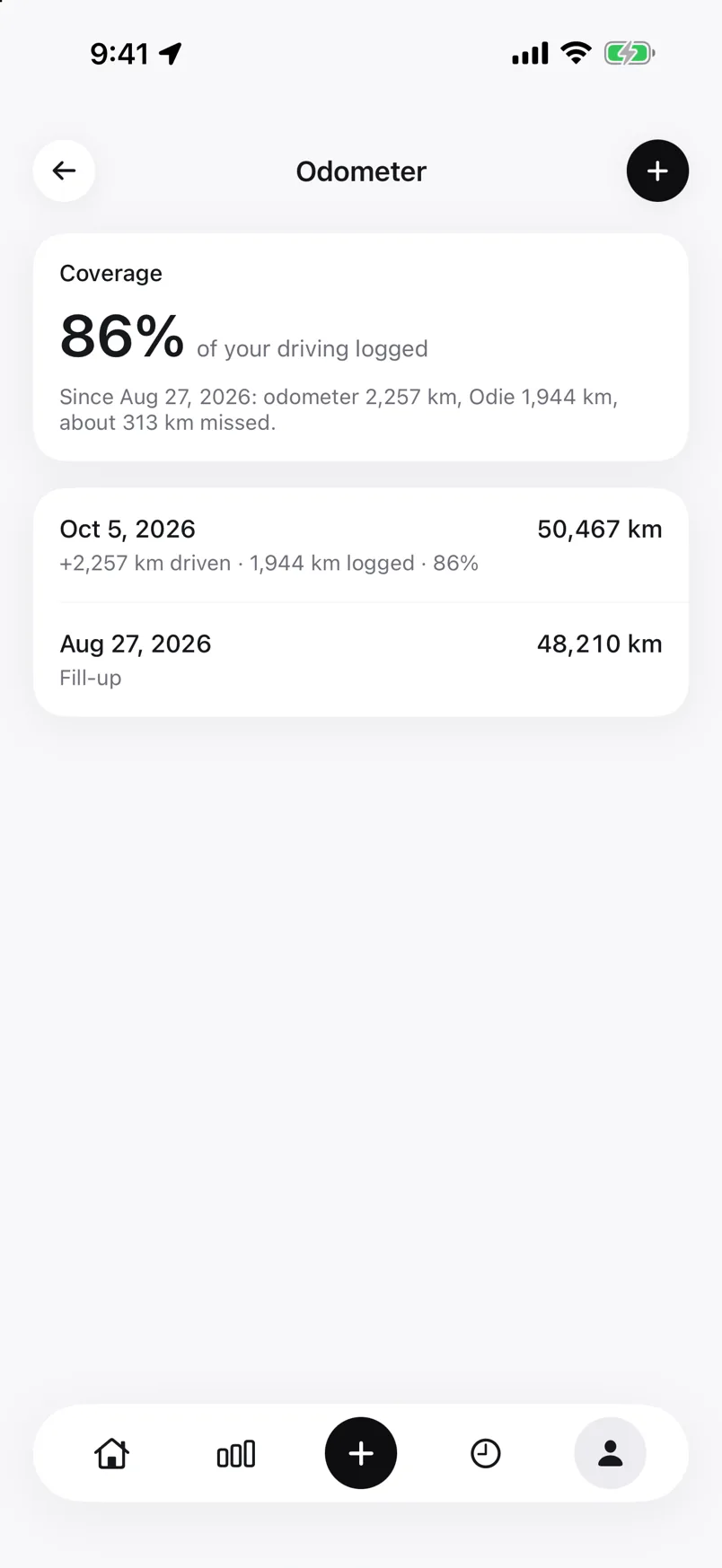 Odie’s odometer screen: dated readings and the share of the car’s driving the log caught between them.
The odometer screen keeps dated readings for each car, each with an optional note, and shows what share of the distance between two readings made it into the log. The odometer check-in, a notification on the 1st of each month at 10:00, asks what the odometer says unless you entered a reading in the past week. Since version 1.0.12 it also comes on December 31 at 4 p.m.: “After your last drive of 2026, take a reading. It closes 2026 and opens 2027 in your report.” Enter reading on the notification opens the reading screen. Only a reading dated December 31 or later closes the year, so since version 1.0.13 that is also the only one that stops the December 31 notification. A reading from earlier that week no longer does. Both notifications are under Odometer check-in in Reminders, on by default, and readings and reminders are in the free tier.
The year report (Odie Pro, PDF and CSV) lists the opening and closing readings with their dates, the odometer distance between them, and the share of it Odie logged. If the log claims more kilometres than the odometer, or the readings do not cover January 1 to December 31, the report says so in its checks, so a missing reading shows up before your accountant asks for it.
One detail on dates. In Odie’s year report, a reading dated December 31 closes that year and opens the next, so the number from the night of December 31 is entered once: the 2026 report closes on it and the 2027 report opens on it. A reading dated December 30 or earlier is still inside the year, and the report’s checks will say the readings do not cover January 1 to December 31. If you missed the night and your first reading is dated in early January, it still closes 2026.
On paper, the mileage log template has an odometer column; Odie fills in the trips as you drive. Here is how Odie keeps a self-employed mileage log, and the sample CRA year report (PDF) shows the opening and closing readings beside the business-use share.
Questions
Does the CRA want an odometer reading on December 31?
The CRA asks you to record the odometer reading of each vehicle at the start and end of the fiscal period. If your business year is the calendar year, that is January 1 and December 31. Employees who deduct car expenses get the same instruction in guide T4044.
Can one reading close 2026 and open 2027?
Yes, as long as the car does not move in between. A reading taken on the evening of December 31, or on January 1 before the first drive, is the end of one year and the start of the next.
What if I already drove on January 1?
Take the reading as soon as you can, date it the day you took it, and add a note with the distance driven since the year turned. The CRA page does not describe a fallback, so the true date and the note are what keep the record honest.
Does Odie remind me on December 31?
Yes, from version 1.0.12. On December 31 at 4 p.m., Odie asks you to take a reading after your last drive of the year. It is part of the odometer check-in, which is on by default and can be turned off in Reminders. The reading you enter that day closes 2026 and opens 2027 in Odie’s year report.